How to Redeem Avengers Evolution Codes
Exact Shop UI steps, troubleshooting, and best practices so every Godly Reward lands on the first try.
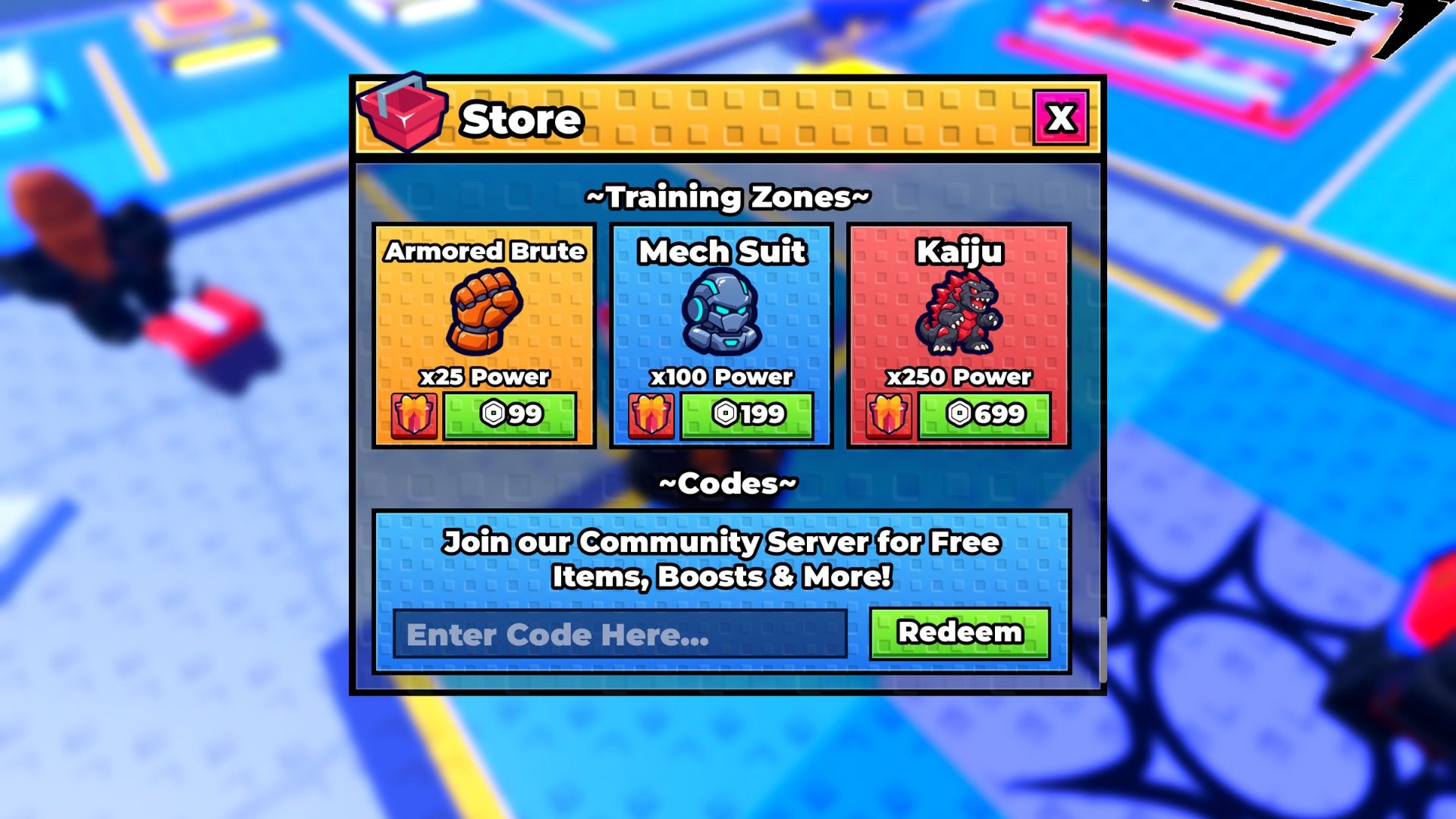
Redeeming Avengers Evolution codes takes under a minute once you know where the Shop panel hides the code box. This guide walks through the full flow for +1 Avengers Evolution on Roblox—desktop and mobile—plus the mistakes that cause “invalid code” errors even when the string is still live on the Codes Hub.
Before you start, open the working list on the codes page and keep RELEASE! and 1000LIKES ready to paste. Both currently grant a Free Godly Reward when entered correctly. After you claim them, return to the getting started guide so the boost feeds Strength training, Wins, Heroes, Pets, Titles, and Rebirth instead of sitting unused.
Before you redeem
- Use a stable connection. Soft-locks during Shop open can eat a redeem attempt or delay the reward popup.
- Finish the initial load. Wait until your hero appears in the training area and HUD buttons are clickable.
- Copy from a trusted list. Prefer the strings on this wiki’s Codes Hub or the official Roblox experience description. Do not type from memory if the code includes punctuation.
- Know that codes are case-sensitive.
RELEASE!is not interchangeable withrelease!orRelease!. - One redeem per account. If you already claimed a code on this Roblox user, you cannot claim it again.
Step-by-step: redeem on desktop
- Go to the Roblox page for +1 Avengers Evolution (Place ID
110268718861848) and press Play. - Allow the experience to stream assets. Stay in the starter world until controls respond.
- Locate the Shop button on the on-screen HUD (typically along the left or side action stack in +1 incremental experiences).
- Click Shop to open the store panel. Scroll if needed until you see a code or Enter Code text field.
- Click inside the box to focus it. Clear any placeholder text.
- Paste
RELEASE!exactly, including the exclamation mark, or paste1000LIKESwith all capitals and no spaces. - Press Redeem (or the equivalent confirm button next to the field).
- Watch for a success toast, inventory update, or reward popup confirming the Free Godly Reward.
- Close the Shop, equip or open the reward if prompted, then repeat for the second code.
If the Shop button is covered by a tutorial arrow or first-time popup, dismiss or finish that prompt first—many new players miss the code box because a modal sits on top of the store.
Step-by-step: redeem on mobile / tablet
- Open the Roblox app, search for +1 Avengers Evolution, and join a server.
- Rotate to landscape if HUD icons feel cramped; the Shop control is easier to tap with more horizontal space.
- Tap Shop. On smaller screens you may need to scroll the panel with a drag gesture to reach the code section near the lower portion of the store.
- Long-press the code field and choose Paste after copying from this guide or the Codes Hub.
- Double-check that mobile autocorrect did not rewrite the string (especially
RELEASE!). - Tap Redeem and wait for confirmation before leaving the panel.
Mobile browsers that open Roblox via a web view sometimes clip the bottom of Shop menus. If you cannot see a code box, fully launch the native Roblox app instead of playing in-browser.
Exact codes to paste
| Code | Expected reward | Notes |
|---|---|---|
RELEASE! | Free Godly Reward | Includes ! — do not drop punctuation |
1000LIKES | Free Godly Reward | All caps, no spaces |
We only document strings verified from the official description. When they expire, the Codes Hub working table is updated first—bookmark that page rather than screenshots that go stale.
Troubleshooting: code will not redeem
”Invalid” or “does not exist”
- Re-copy the string from the codes list and paste again.
- Confirm capitalization and punctuation.
- Remove invisible characters by pasting into Notepad first, then copying a clean line.
- Verify you are in +1 Avengers Evolution by +1 Spidey Evolution—not a similarly named incremental clone.
”Already redeemed”
- That Roblox account already used the code. Switch accounts only if you intentionally want a second claim on an alt.
- Check inventory or reward mail in case the gift arrived without a loud popup.
Button does nothing
- Rejoin the server; Shop scripts can fail to bind after a partial load.
- Disable overlays that block clicks (recording software, floating widgets).
- Try another device to isolate a touch or mouse capture issue.
Reward missing after success message
- Relog once; some grants appear after a short sync delay.
- Open inventory, backpack, or any Godly / reward claim UI the game exposes.
- If nothing appears after several minutes and a relog, note the time and check updates for known reward bugs.
Best practices after a successful redeem
Claiming free power is only half the value. Spend it with intention:
- Train Strength until your clicks and attacks clear the current enemy tier without long stalls.
- Convert progress into Wins so you can unlock the next Hero instead of over-investing in a dead-end upgrade.
- Hatch Pets and roll Titles when those systems unlock—multipliers multiply harder after Rebirth.
- Plan your first Rebirth using the getting started checklist so you do not reset too early or too late.
- Cross-check priorities on the tier list before dumping Godly value into a weak Hero.
Codes are the safe free path. If you later explore automation, read the Scripts Hub and how to use scripts for risk warnings—never confuse a promo code box with an executor paste field.
How often should you recheck codes?
+1 Avengers Evolution launched on 2026-10-29 and continues to receive updates (notably around 2026-11-20). Milestone codes often appear when likes, visits, or world unlocks hit a target. Recheck:
- After every patch note on the updates hub
- When the Roblox description gains new bold “USE CODE” lines
- Whenever the creator group posts a celebration or like goal
Set a habit: join the game, open Shop, redeem anything new from this wiki, then train. That five-second loop prevents missing limited Godly drops.
Related links
- Codes Hub — live working and status table
- Getting started — spend rewards efficiently
- Tier list — Heroes, Pets, and Titles worth investing in
- Updates — patch timing for new code drops
- Scripts Hub — optional tools with account-risk context
Follow these steps carefully and both current Avengers Evolution codes should redeem cleanly. When new strings appear, the same Shop path applies—only the text you paste changes.
Frequently Asked Questions
Quick answers for codes, heroes, rebirth, and progression.
Where is the code box in Avengers Evolution?
Open the Shop button on the HUD, then find the Enter Code field inside the Shop panel. Scroll on mobile if the field sits lower in the menu.
Why does RELEASE! say invalid?
Usually a capitalization or missing exclamation mark issue, a prior redeem on that account, or an expired code. Paste exactly from the Codes Hub and retry after a clean rejoin.
Can I redeem codes on mobile?
Yes. Use the Roblox app, open Shop, paste the code carefully so autocorrect does not alter it, then tap Redeem.
Do I need Roblox Premium to redeem?
No. Promo codes in +1 Avengers Evolution work on standard accounts. Premium is unrelated to entering RELEASE! or 1000LIKES.
What should I do after claiming a Godly Reward?
Train Strength, bank Wins toward Heroes, and follow the getting started guide so the boost compounds into Pets, Titles, and Rebirth.